Made in GermanyPay yearly, two months free: Start €124.17 / month (€1,490 per year instead of €1,788).See pricing 2 months free

Manufacturing

Maintenance documents in the right revision, at the right place.

Every machine has manuals in several revisions. Maintenance often finds the wrong one, or searches too long.
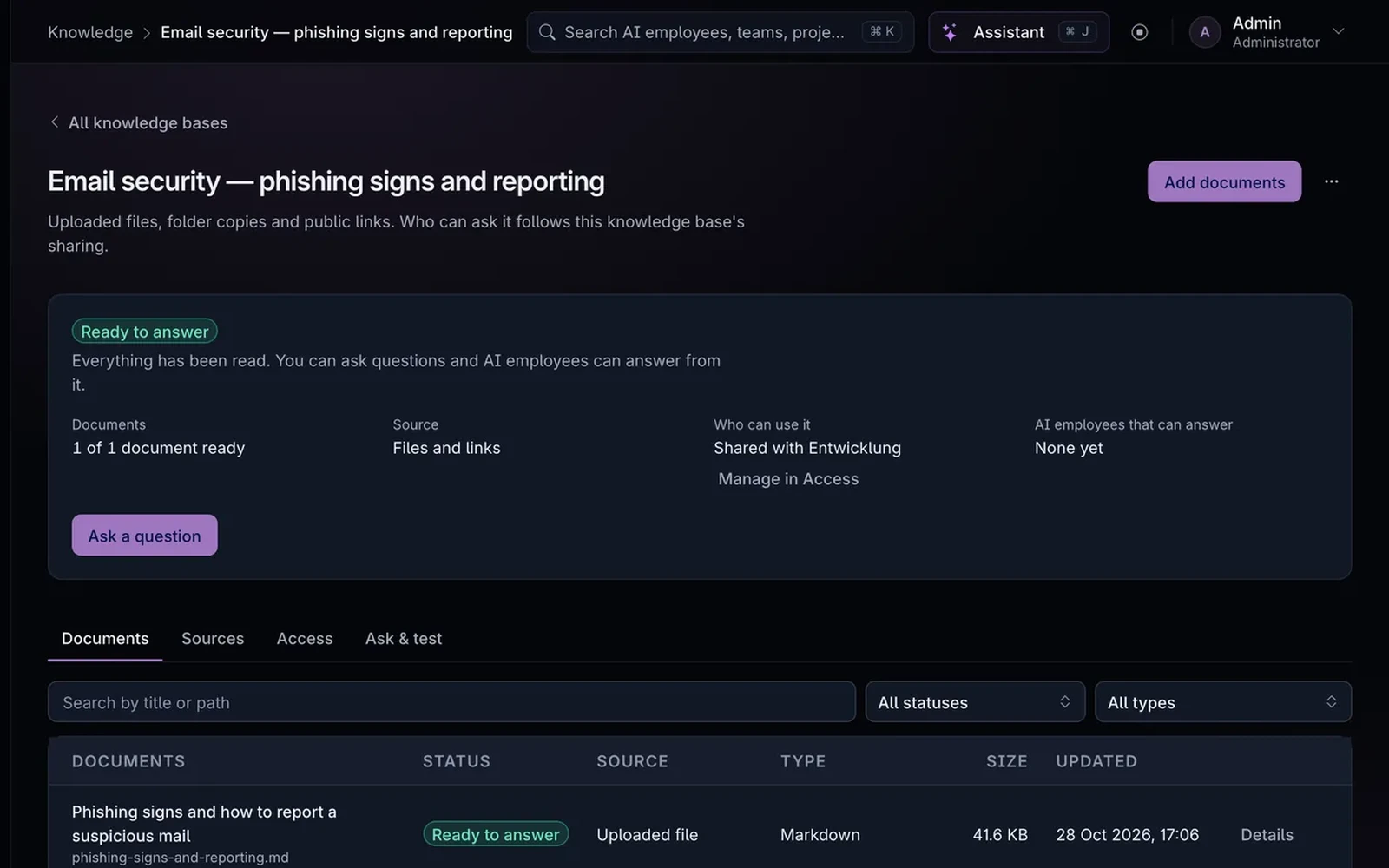
Knowledge: the documents answers with passages come from.

Today in your business

What gets left undone in maintenance and purchasing

Every page of the maintenance sheet shows revision and date.

  • Wrong revision in handManuals in three revisions: maintenance finds the wrong one or searches too long.
  • Raw material prices change weeklySteel, aluminium, granulate: purchasing sees it on the invoice.
  • Faults repeat unnoticedShift logs document, but nobody reads across.

3 interactive workflows MITDesk prepares

Pick a real business situation, start the demo, test missing details or rejection, and inspect the verifiable output.
1. Select a business situationDemo using sample data

Maintenance documents by revision

Manufacturing · Demo using sample data

On request from the maintenance order in OdooNew

Maintenance order W-2026-118: press 3

Manufacturing

Due Wednesday, maintenance team B.

Systems & rights:QuestionDocumentsPerson reviews
Explore situation
NewStep 1 of 5

Maintenance order W-2026-118: press 3

  • Due Wednesday, maintenance team B.
Decision point: human approvalSafe demo simulation only

Approval before outbound action or update

Maintenance sheet with passages

Maintenance order W-2026-118: press 3Maintenance order W-2026-118 · Hydraulic press 3 (SN 44819)
Maintenance · Maintenance sheet by valid revisionDemo using sample data

Maintenance order W-2026-118 · Hydraulic press 3 (SN 44819)

Verified revision
Manual Rev. C (2024 per retrofit log) · Lubrication chart · Safety data sheet
Compiled chapters
Ch. 7.2 Hydraulic pressure check (pp. 42-45) · Ch. 9.1 Lubrication points (pp. 58-59)
Every page carries serial number, revision letter, and validity date for the shop-floor tablet.
Sources: Manual_Press3_RevC.pdf · Retrofit_Record_2024.pdf

What stays with your team

Only the document is released, not the machine. Interventions stay with maintenance.

Check this workflow for my business

Demo using sample data - no real emails, bookings, payments, or system updates are triggered.

When something is missing or does not match

Revision unclear. Rev. C, and a task: fix the master data.

Typical connections

All integrations

System integration & setup

How MITDesk works with maintenance, document revisions, and purchasing

Manufacturing companies connect their technical document folders (machine manuals, revision lists, shift logs), raw-material price sources, and optionally their maintenance and purchase orders in Odoo.

1. Mailbox, calendar & file folders

Start without rebuilding your IT: the AI employee reads a permitted mailbox, an availability calendar, and your shared document folders (e.g. Microsoft 365, Google Workspace, Nextcloud, or IMAP).

2. Direct connection to supported applications

Where a supported connector is available (e.g. Odoo, Zammad, GitLab, Qonto, Lexware Office, sevDesk), the AI employee works through its own strictly scoped user account.

3. Alongside existing sector software

If your sector or practice software does not expose an open write API, MITDesk works cleanly alongside it via incoming emails, file exports, or the side panel - and your team applies the verified result.

MITDesk never interacts with machine controls; it delivers verified documents and reports with explicit revision metadata. The connections named here are built and tested with test data; verified in real use so far is Odoo (Odoo 20, our own system). We qualify each further one with your account during onboarding before it runs in production.

How you start

"Maintenance documents by revision" as your first workflow.

Configure your task in the solution configurator or send us an enquiry; we guide the onboarding. At first the AI employee observes and prepares drafts; every outbound reply or record change waits for your team's approval.

Price orientation: Start from €124.17 / month billed annually (€1,490 per year instead of €1,788; or €149 billed monthly, 1 AI employee) · Team from €374.17 / month billed annually (€4,490 per year; or €449 billed monthly, up to 5 AI employees) · paid upfront, monthly or annually. All prices net plus AI model usage.

  1. Step 1Select task & scopeChoose your workflow, volume, and existing tools in the configurator.
  2. Step 2Connect & observeEach connection uses its own account with scoped rights. The AI employee prepares drafts while your team compares.
  3. Step 3Approve with confidenceOutbound messages and system changes wait for your approval according to your rules.
  4. Configure this workflowSee all plans & prices

Frequently asked questions: Manufacturing

What happens if two different revisions are found for a machine serial number?

When a delivery note and a retrofit log conflict, MITDesk never picks a revision on its own; it presents both sources to the maintenance lead for decision.

Can MITDesk run entirely inside our plant network?

Yes. With the Private Self-Hosted licence, MITDesk and your own model server run entirely on your on-premises infrastructure.

How does MITDesk handle illegible handwritten shift-log scans?

Illegible entries are never guessed; they are flagged in the weekly report by shift and date as an open gap.

Want to calculate effort and package fit for your team?

The 5-step solution configurator pre-selects this industry and task, calculates the time scenario, and recommends the fitting setup.

Configure for your business