
Made in GermanyPay yearly, two months free: Start €124.17 / month (€1,490 per year instead of €1,788).See pricing 2 months free

A day with MITDesk

What MITDesk prepares for your team throughout the day.

The orbits show ten recurring areas of work around your workspace - from morning reception and customer enquiries to documents, quotes and end-of-day handovers. Click any node: every single one shows the input, the work MITDesk performs, the output and your team's decision. Demo using sample data.

Click any task node, scroll through the day or pause the animation at any time

app.mitdesk.example
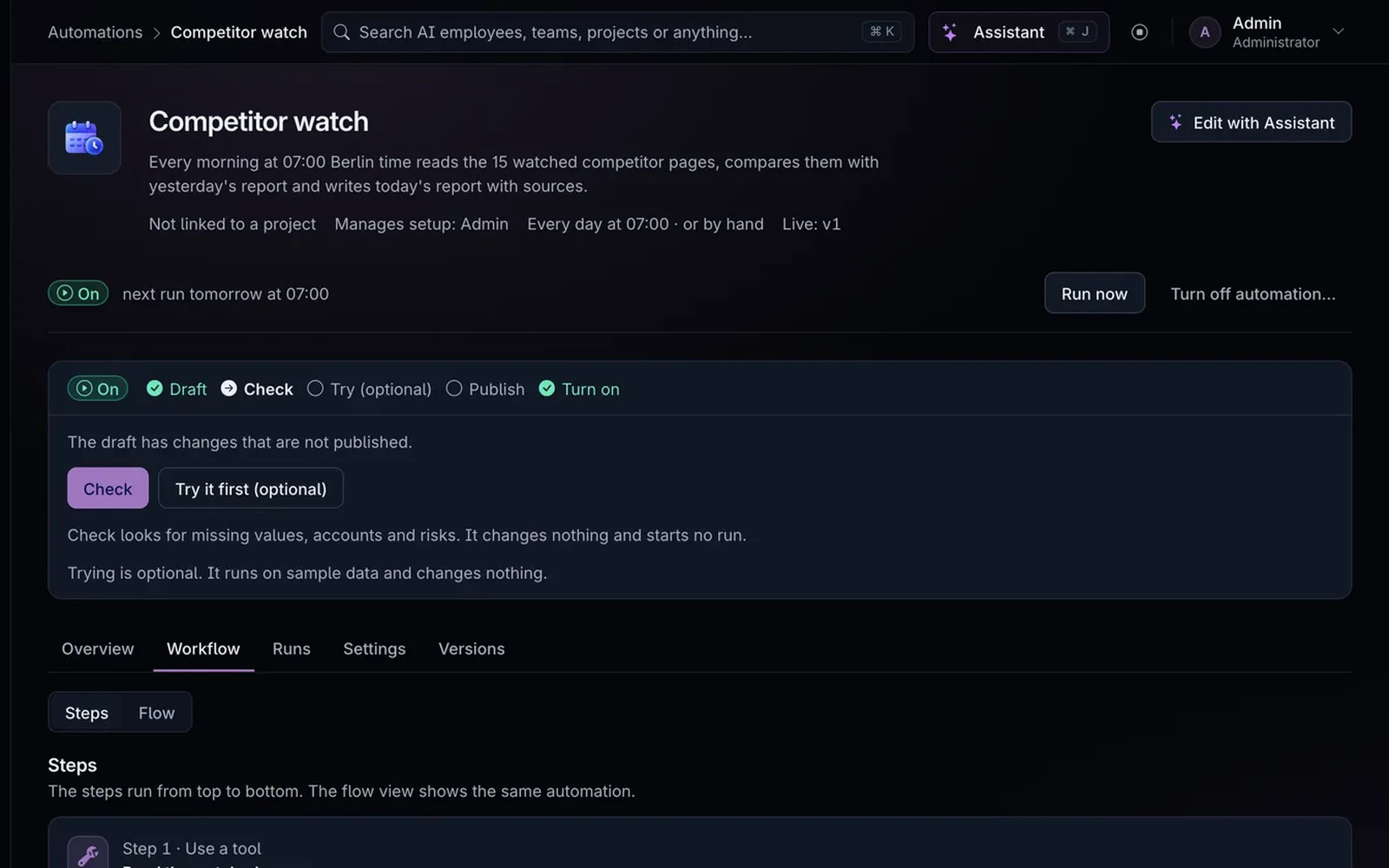
Workflow steps and schedule in the workspace. Product capture, sample data.

What this diagram shows: Your MITDesk workspace sits in the centre. Each node on the rings represents a recurring business task (primary label) and the connected application (secondary label).

MITDesk
07:00 · Monitor prices & websites

Monitor prices & websites

Public websites → mailbox · Market Analyst (AI employee)

Input07:00 schedule: 15 selected dealer and price pages.
MITDeskReads current prices with timestamps, compares with yesterday and flags 3 differences above 5 %.
OutputPDF daily report with 15 source links and a prepared price adjustment draft.
Your decisionPurchasing lead reviews the report and decides on the price change with one click.

Demo using sample data. No live connection to customer systems is made on this website.

All 10 task areas at a glance (tap to inspect)

  • Primary label = your team's task · secondary line = the connected application
  • Clicking any of the 10 nodes opens the input, MITDesk's work, the output and your decision
  • Reading and drafting follow your rules; system changes wait for your approval by default
  1. 07:00

    Monitor prices & websites

    Public websites → mailbox

    Marktanalyst

    Flow: input to decision

    1. Input: 07:00 schedule starts the price and market check
    2. Work: 15 selected dealer pages read with timestamps, 3 changes above 5 % flagged
    3. Output: PDF report with 15 sources in the mailbox + prepared price proposal
    4. Decision: Purchasing lead reviews the proposal and decides on approval

    Prepared output

    Daily report with 15 sources & decision card

    PDF, 3 pages with timestamps. The proposed price update waits for the purchasing manager's approval.


    Report ready
  2. 07:45

    Reception appointments & enquiries

    Microsoft 365 · Mailbox & calendar

    Empfangsassistent

    Flow: input to decision

    1. Input: 11 overnight emails - appointment requests, a cancellation and preparation questions
    2. Work: Requests sorted, missing details highlighted, waiting list checked and replies drafted
    3. Output: Reception briefing with prepared reply drafts and 2 waiting-list candidates
    4. Decision: Reception checks the drafts, confirms bookings in the schedule and sends the replies

    Prepared output

    Reception overview & reply drafts

    Your team immediately sees where details are missing and who can fill the cancelled slot.

    Ready for review
  3. 09:41

    Record & reply draft in Odoo

    Odoo CRM & Helpdesk

    Helpdesk-Triage

    Flow: input to decision

    1. Input: New ticket #4821 "Invoice received twice"
    2. Work: Ticket history, invoice RE-2026-0142 and guide read with the Odoo account's permissions
    3. Output: Reply draft prepared directly on the open Odoo ticket
    4. Decision: Jonas Weber reviews the draft in the chatter and sends under his name

    Prepared output

    Reply draft on the Odoo record

    No copying back and forth between windows: the draft sits ready on the ticket, sent by your team.

    Needs you
  4. 14:02

    Answer from contracts & documents

    Nextcloud · Knowledge base

    Wissenskurator

    Flow: input to decision

    1. Input: Question in the Assistant "How many revision rounds are agreed with Nordwind?"
    2. Work: Searched only knowledge bases Tom Richter is authorised to open
    3. Output: Answer with direct quote from Framework Contract 2025, page 4, §6
    4. Decision: Tom Richter verifies the displayed passage and informs the client

    Prepared output

    Answer beside the original passage

    "Two rounds per motif" - Framework contract 2025, page 4, §6. If the documents do not cover it, MITDesk states that clearly.

    With citation

Clear structure

Every automated workflow consists of four understandable building blocks.

  1. 1. Trigger or schedule

    Daily in the morning, weekly or whenever a new email, enquiry or ticket arrives.

  2. 2. AI employee with a role

    With a clear responsibility, scoped read access to selected programs and a responsible person.

  3. 3. Your approval rules

    You decide what is presented as a draft and which routine steps may run. Money, deletions and security always ask.

  4. 4. Verifiable output & audit log

    Every output names its sources and any missing details. All accesses and approvals are recorded in the exportable audit log.

A configured workflow in the workspace: check steps, schedule and versions. Product capture using sample data.

Which tasks should MITDesk prepare for your team first?